
Layetri self-proclaimed music tech witch
"I want a synth that can do
everything."
- me, March 2022Hi! I'm Layetri.
For my third year project at HKU (University of the Arts Utrecht, the Netherlands), I've spent the past three months working full-time on building my own digital synthesizer. This page tells the story of its creation, details future plans, and explains how you can obtain your very own Donut!
From Zero to Donut
November 2021 I have an idea
The first idea that led to Donut's creation was actually very different than the direction the project is currently taking. I came up (half-jokingly) with the concept of a synthesizer that uses a model of a donut throughout its entire synthesis path. Filters, modulation, sound sources, and effects would all be based on the general shape of this sweet snack. It would also include a granular effect that would "add the sprinkles on top". I started building a prototype for this concept in my spare time, putting special attention towards polyphony algorithms that would power this thing.
March 2022 I need a project, and fast
Fast forward a few months, I was making steady progress in my free time. However, for my third year project at HKU (University of the Arts, Utrecht), I had to come up with an idea for a project after a group effort fell through. At that moment, I decided to start working on Donut full-time. This also meant defining the scope of the project, and thus the "synth that does everything" was born.
The Pitch
In March, I pitched my idea in class. This presentation outlined an idea for a synthesizer that would contain the following:
Things that were already there
- 2x WaveTable oscillator
- 2x additive WaveShaper
- n-voice polyphony
- Presets system
Things I wanted to add
- Stereo effects
- More sound sources
- Complex physical modeling engine
- Granular engine
- Modulation matrix of sorts
Besides these software features, I wanted to create a hardware synthesizer that could be used as a standalone instrument on stage, complete with integrated keybed and controls. This hardware implementation would be based around a Raspberry Pi 4B mini computer, and use a bare metal framework to run the firmware as close to the CPU as possible.
April 2022 devlogs and feature bloat
In late March, I created the first Donut Devlog video, demonstrating the current sound of the software. I used these videos to log my progress week by week(-ish). The first four videos were created during April, giving a broad overview of the progress made during this month:
April saw the biggest number of features added. A few notable additions are the Tensions physical modeling engine, the Sampler instrument, and the internal Parameter control handling system.
May 2022 sanitizing and polishing
When most systems were in place, I started working on cleaning up the output audio. There were a lot of artifacts and clicks in the output, partially caused by problems in rendering and bugs in the audio engine connector. When the main issue with the JACK connector was resolved, I focused on decreasing processing times and making the system more stage-ready. This included things like separating the synthesis thread from the actual audio engine connector, and tweaking the gain staging for all the steps in the processing chain.
The Future after the project deadline
When the project at HKU is over, the work has only just begun. I have a long list of features I'm still planning to add. First and foremost, I will be focusing more on the hardware side of things, finalizing the first design and getting a prototype PCB made. After hopefully not too many iterations, the schematics and board designs will be published on this site. Besides hardware, I will be implementing the missing effects and filters. I'm especially looking forward to building the glitch effect, as it will add sonic capabilities to my setup that I don't currently have. I'll also work on a GUI overhaul, combining custom OpenGL elements with the current GUI library to create a more polished and integrated experience.
...but how does it work?
About Note Handling
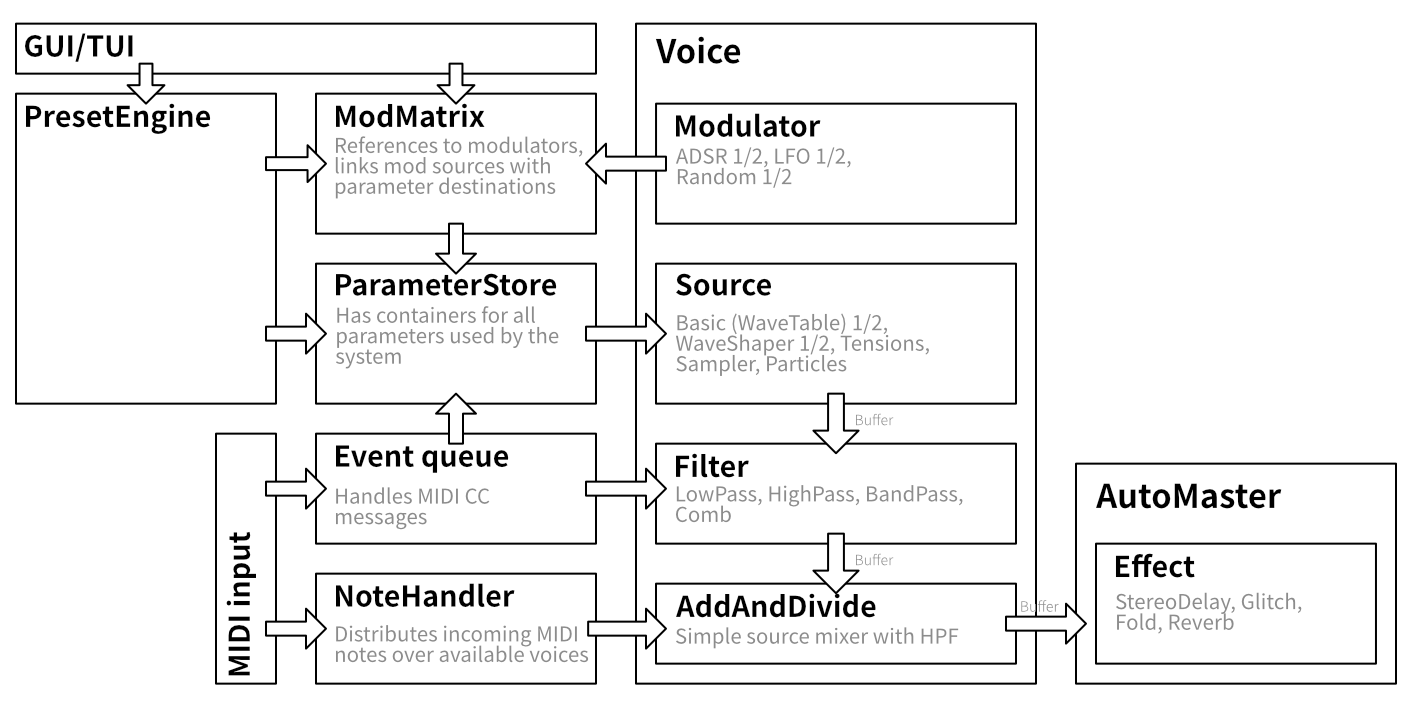
Donut uses a round-robin algorithm to assign notes in the most natural way. This means that each incoming note is assigned to the next voice, no matter the state of the previous voices. Because of this assignment method, note releases are preserved as long as possible. This results in a more comprehensive output sound. If all 12 voices are already in use, Donut will look for the voice that has been assigned the earliest and "steal" it to play a new note.
About Sources
This sound source has 3 waveforms (Sine, Square, and Triangle) that you can fade between.
WaveShaper adds sine waves together to create rich additive sounds.
A physical modeling instrument with positive feedback, that can be used to create all sorts of string sounds.
With Sampler, you can load your own sampled sounds into Donut and play them like an instrument!
Particles is a granular sound engine that granulates prerecorded samples. It comes with a suite of playback options to apply to this process.
About Parameters
Donut implements a global parameter system that makes sure values are synchronized between all different parts of the synthesizer. Settings are stored in a central storage class, which is then available to all other system components. This allows preset loading to be as seamless as it is, and gives the entire application access to all the values it might need.
About Modulators
A basic oscillator that outputs a slow sine wave for use in modulation.
An envelope generator with Attack, Decay, Sustain, and Release phases. Note velocity is mapped to the sustain level of this modulator by default.
Generates random numbers for use in modulation. You can control the interval at which new numbers are generated, and a slew can be applied for smoother output.
A global sequencer that can be synced to note input, turning it into a sort of arpeggiator.
About Presets and Maps
In Donut, it's possible to save almost all user settings as presets or controller maps.
Presets are used to store values that are contained in the central parameter pool, and are recalled easily. It's also possible to load external saves by putting them into the .donut_runtime directory. This is also where controller maps are stored, which contain mappings for MIDI controllers. These can be exported from the command line interface, an implementation for the GUI is still in the works.
About Effects
A two-channel delay effect on the master output, with a maximum delay time of 1000ms.
A distortion effect that applies a gain to the input sound wave and then folds it back on itself.
A rich reverb effect, based on the classic Schroeder reverb algorithm.
A modern glitch engine, applying various glitches (reverse, stutter, bit crush) to the output sound.
About connecting all of these together
All these systems and modules are interconnected through a few key services components: Presets, Parameters, Modulation Matrix, and Control Map. The current system design looks something like this:
...and what can it do?
Using the modulation matrix and parameter pool, it's possible to make a lot of interesting patches using Donut. The possibilities are almost endless, but here are some examples that might result in an interesting sonic palette.
Patch #1 Feedback Strings
Patch #2 Random Harmonics
Patch #3 ...
Patch #4 ...
That's amazing, where can I get it?
Now hold on to your horses. This project is still in active development, and there are currently no production builds available. However, if you're crazy enough, you can attempt to build it yourself, for which I made build targets for macOS and Linux.
Please note that I do not provide tech support, and building Donut from source code is completely at your own risk. If you discover a bug (of which there are plenty), please open an issue on GitHub. If you can think of a solution, feel free to create a pull request too!
Step 1 getting Donut and Dependencies
Difficulty level: 2 sprinkles
This first step involves Git and your package manager of choice. On macOS I use Homebrew and on Linux I use apt. For a start, let's download the source code of Donut. This can be done using Git:
Now that you have obtained the source code, let's install its dependencies. The requirements are different between macOS and Linux, so make sure you select the right platform. Besides installing dependencies through your package manager, make sure you have installed the JACK Audio Connection Kit from their website.
Step 2 building Donut
Difficulty level: 2 sprinkles
After collecting all the dependencies, it's time to look at the building process itself. Donut uses CMake to generate its build files. For the build process, I use clang on macOS and gcc on Linux. If you haven't installed these yet, you should do it now.
First, we can generate the build files like this:
With these build files, we can create the application binary.
Congratulations, you've just obtained yourself a Donut executable!
Step 3 running Donut
Difficulty level: 1 sprinkle
To run Donut, it is important that JACK is running. On Linux, it's also recommended to use a MIDI bridge like a2jmidid. Donut runs the best with a JACK setup like this:
Then, you can run Donut! Make sure to run it from the project root folder, like this:
How do I...
...load presets?
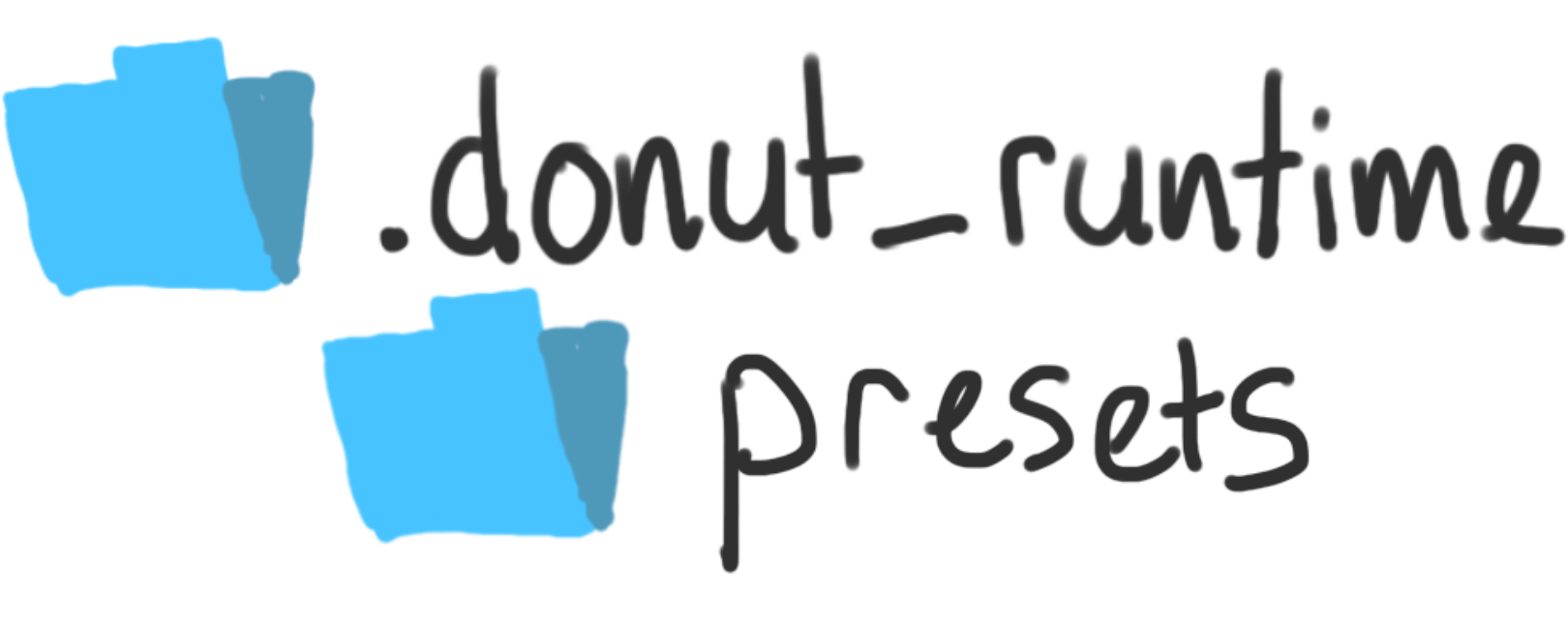
To load .donutpreset files from external sources into Donut, you can put them into the presets folder, found in path_to_donut/.donut_runtime.
github
Disclaimer
Everything on this page was developed and designed by me. I did, however, use some third party libraries. This website runs on Laravel, and uses VueJS and TailwindCSS as well. For any info on open source code used for Donut, please check the GitHub repository.
Notes
This project is under active development. Any features listed on this page may be changed or removed at any time, and this website may not reflect the current state of the software. For an up-to-date overview, check the GitHub repository.
Note for pros
Are you looking to hire an audio/music dev with experience in a broad range of programming applications? Check out my full portfolio on layetri.nl!